Jobright AI Review (2026): I Tested It to See If It's Worth It
I tested Jobright AI's job matching, resume scoring and interview prep. Here's what works, what's paid, what it costs and who should use it in 2026.

· 9 min read

Key takeaways
- Jobright is an AI job search copilot that matches you to jobs, tailors your resume, autofills applications and finds people who can refer you. It's best for US-based job seekers, especially in tech and early in their careers.
- The free plan runs on small daily credits. In my test, the resume editor showed 0 credits left and the interview question bank was locked behind the paid plan.
- The paid plan, Turbo, is reported at $17.99 a week, $39.99 a month or $89.99 a quarter, and Jobright only shows its prices after you sign up.
- Jobright lists US-based roles only, according to its own App Store listing.
- It's rated 4.8/5 from 3,656 reviews on Trustpilot, 4.8/5 on the App Store and 4.6/5 on Google Play, with complaints about renewal charges and job relevance.
On this page
- What is Jobright AI?
- Key features
- What I found in my Jobright test
- AI job matching
- Personalized recommendations
- AI resume scoring and tailoring
- Auto-apply and autofill
- Orion, the AI copilot
- Interview question bank
- My overall experience
- Where does Jobright AI fall short?
- How much does Jobright cost?
- Is Jobright Turbo worth it?
- Jobright AI ratings and user reviews
- What are Jobright users saying?
- Is Jobright worth it? My verdict
- Jobright vs HiringNow: where do they differ?
- Which should you choose?
Jobright is a good fit if you're job hunting in the US, especially in tech or early in your career: its job matches are relevant, its resume scoring is useful, and its referral finder is something most tools don't have. The catch is the free plan. It runs on small daily credits, auto-apply and the interview question bank are paid, and you only see what Turbo costs after you sign up.
I signed up in September 2026, worked through the free plan, then upgraded to Turbo to test the paid features too: auto-apply, unlimited resume tailoring and the interview question bank. Prices and ratings below were checked on October 26, 2026.
What is Jobright AI?
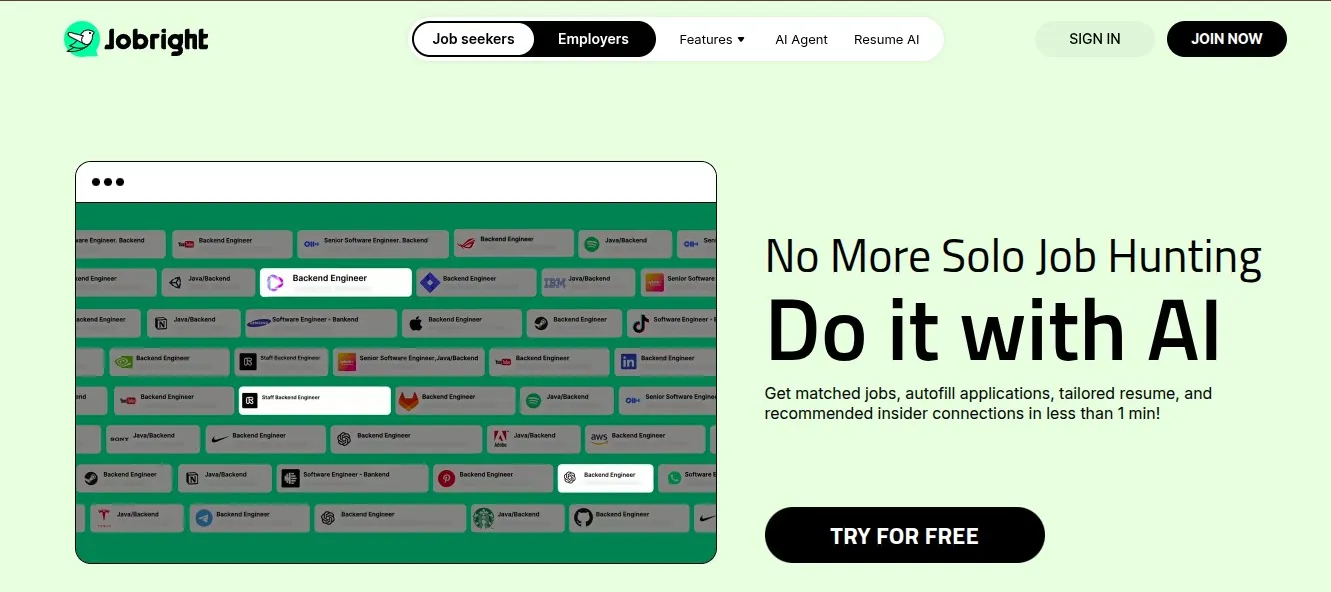
Jobright is an AI job search platform that finds jobs that match your profile, tailors your resume to them, and speeds up applications. It combines AI job matching, resume tailoring, application autofill, insider referrals and an AI career copilot called Orion in one place.
It has a free plan with limited daily credits, and a paid plan, Turbo, for unlimited access.
Key features
- AI job matching and personalized recommendations
- AI resume scoring and tailoring
- Job autofill through a Chrome extension
- Auto-apply through Jobright's AI Agent (paid)
- Insider connections: alumni and hiring managers who can refer you
- Orion, a 24/7 AI career copilot
- A bank of real interview questions (paid)
- Application tracking, plus job and company insights
What I found in my Jobright test
AI job matching
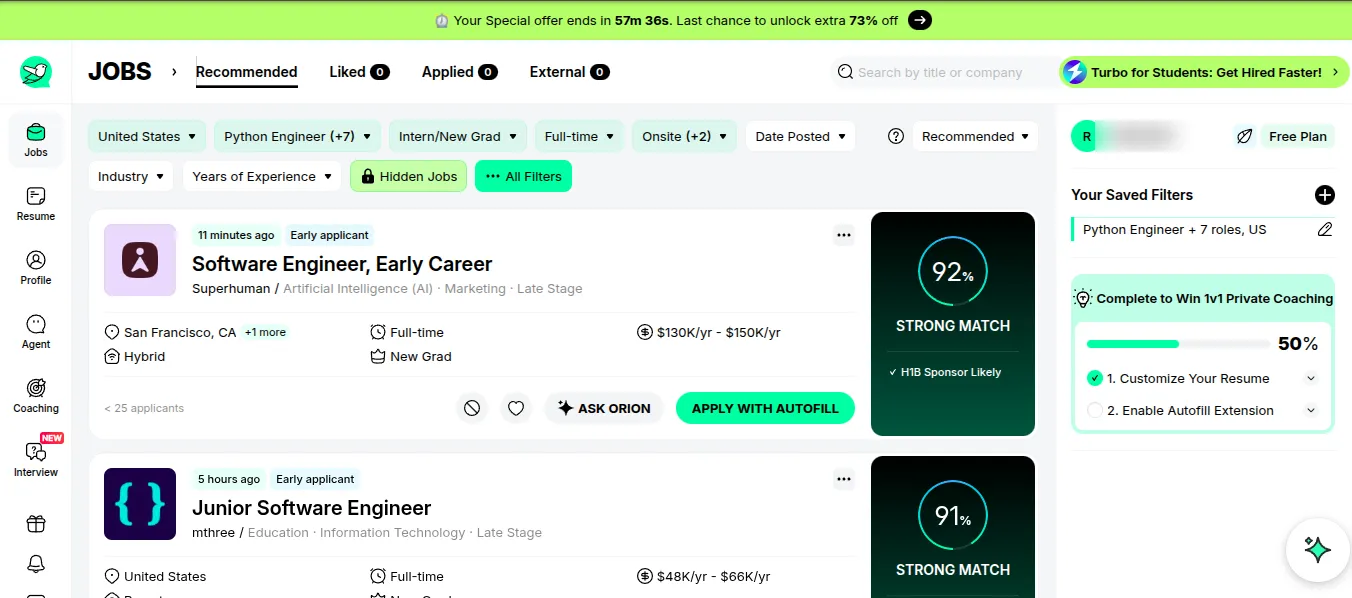
After I created my profile with my skills, education and career interests, Jobright started recommending jobs straight away. I filtered for the United States, Python Engineer and seven related roles, Intern/New Grad, full-time and onsite.
The top two matches were a Software Engineer, Early Career role at Superhuman, scored 92% "Strong Match", and a Junior Software Engineer role at mthree, scored 91%. Each card showed more than a match score:
- When it was posted: 11 minutes ago and 5 hours ago, both tagged "Early applicant"
- Competition: fewer than 25 applicants on the first one
- Pay: a salary range, $130K–$150K a year and $48K–$66K a year
- Visa signal: "H1B Sponsor Likely" on the first match
What I liked is that it didn't depend on a single keyword. It used my whole profile, so I saw roles I wouldn't have searched for by title.
Personalized recommendations
The recommendations are only as good as your profile, so it's worth completing it properly. Jobright nudges you to do this: a checklist on the side showed my profile was 50% complete, with "Customize Your Resume" done and "Enable Autofill Extension" still to do.
A high match score still isn't a reason to apply. Some roles looked right at first but asked for experience I didn't have, so I read every job description before deciding.
AI resume scoring and tailoring

Jobright graded my resume A (Excellent), with 0 urgent fixes, 1 critical fix and 0 optional fixes. Tailoring works per job: pick a posting and Jobright adjusts your resume to bring forward the skills it asks for. If a job leans heavily on Python, databases or cloud, those parts of your experience move up.
The limit is credits. On the free plan, my resume screen showed 0 credits available, so more tailoring means waiting for the next day's allowance. Turbo removes that limit.
Some Trustpilot reviewers say the AI's keyword suggestions can read unnaturally. Read every tailored version before you send it, and remove anything you can't back up in an interview.
Auto-apply and autofill
Jobright has two ways to speed up applying:
- Autofill: the Jobright Autofill Chrome extension fills in application forms with your details. It's free, and rated 4.9/5 from 393 ratings with about 300,000 users on the Chrome Web Store.
- Auto-apply: Jobright's AI Agent matches jobs, tailors your resume and submits applications for you. It's a Turbo feature: on the free plan, the agent page asks you to "Unlock Auto-Apply", so I tested it after upgrading.
Autofill handles the basic fields. Custom questions, dropdowns and employer-specific fields still need your attention, so check each form before you submit.
Orion, the AI copilot
Orion is Jobright's AI career copilot, and it's available on every job card through an "Ask Orion" button. Instead of using AI for one task, you can ask it about the whole search: what a role involves, which skills it needs, or whether your experience is a good match before you apply. Jobright says Orion can also help you prepare for behavioral interviews.
Interview question bank
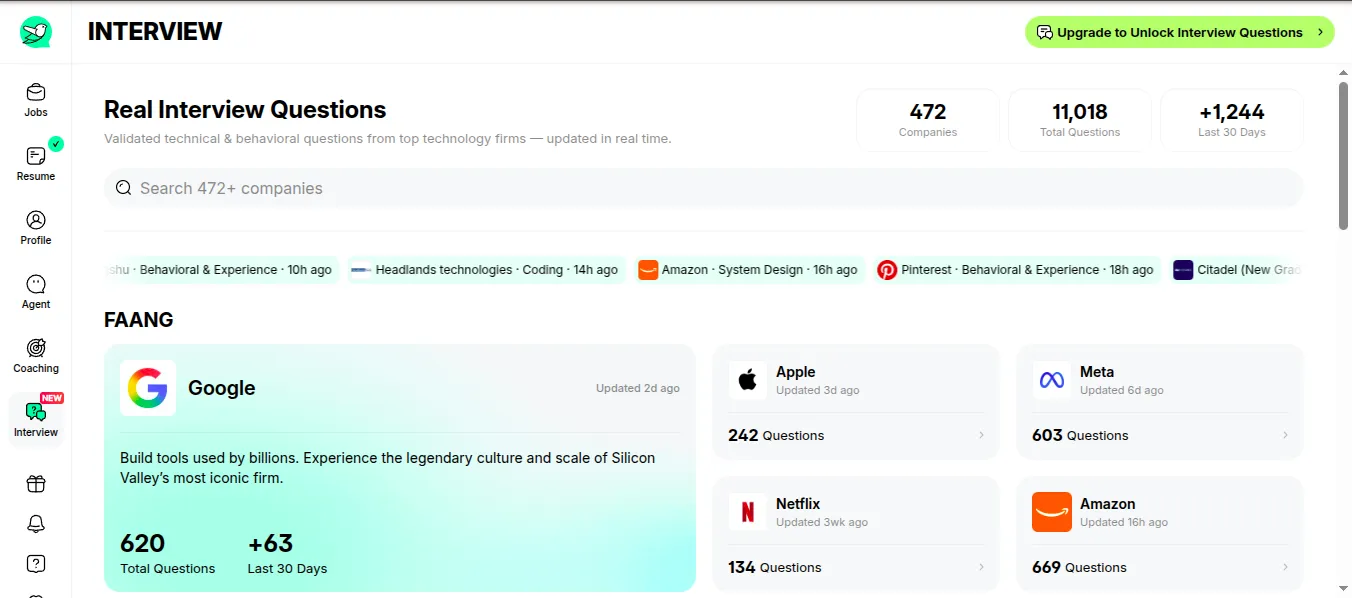
The Interview tab is a bank of real interview questions: 11,018 questions from 472 companies, with 1,244 added in the last 30 days. Amazon had 669 questions, Google 620, Meta 603, Apple 242 and Netflix 134.
On the free plan you can see the companies and counts, but the questions themselves are locked behind an "Upgrade to Unlock Interview Questions" button. Turbo unlocks them.
My overall experience
Jobright's main advantage is that it brings most of a job search into one workflow. Instead of searching on one site, tailoring your resume in another, applying somewhere else and tracking it all in a spreadsheet, you do it in one place.
The most useful parts for me were job matching, the detail on each job card, and resume scoring, because they cut out repetitive work. I'd still treat Jobright as an assistant, not an autopilot: you need to check requirements, review every tailored resume, and decide which jobs are worth your time.
Where does Jobright AI fall short?
- Job matching isn't job fit: a 92% match doesn't mean you meet every requirement. Always read the full description.
- Autofill still needs checking: it handles basic details, but custom questions, dropdowns and employer-specific fields often need manual input, and some Trustpilot reviewers say it occasionally fills in the wrong information.
- AI suggestions need editing: some Trustpilot reviewers found its keyword suggestions unnatural. Anything you can't back up in an interview makes your resume less trustworthy.
- Pricing is hidden until you sign up: the homepage doesn't show plans or prices, so you can't compare costs before creating an account.
- The free plan is restrictive: daily credits run out quickly, and auto-apply and the interview question bank are paid.
- US roles only: Jobright's App Store listing says it "currently lists U.S.-based roles only".
How much does Jobright cost?
Jobright doesn't publish a pricing page; you see plans only after you sign up. These are the Turbo prices reported in 2026:
| Plan | Price |
|---|---|
| Free | $0, with small daily AI credits |
| Turbo weekly | $17.99 a week |
| Turbo monthly | $39.99 a month |
| Turbo quarterly | $89.99 a quarter (about $30 a month) |
What you see can differ. In my test, the app showed a "Turbo for Students" offer and a countdown banner offering an extra 73% off, so check the price at checkout.
Is Jobright Turbo worth it?
- Applying to a few jobs a week: the free plan is enough. Use it for matching and the occasional resume edit.
- A short, intense search: the weekly plan at $17.99 lets you use auto-apply and unlimited tailoring for a sprint. Cancel before it renews if you don't need more.
- A search you expect to last months: the quarterly plan works out to about $30 a month, cheaper than paying monthly.
Whichever you pick, set a reminder before the renewal date. Unexpected renewal charges are the most common complaint in Jobright's reviews.
Jobright AI ratings and user reviews
| Platform | Rating | Reviews |
|---|---|---|
| Trustpilot | 4.8/5 | 3,656 |
| App Store | 4.8/5 | 1,600 ratings |
| Google Play | 4.6/5 | 733 (50,000+ downloads) |
| Chrome Web Store (Autofill) | 4.9/5 | 393 ratings (300,000 users) |
| Product Hunt | 4.8/5 | 12 (#1 Product of the Month, July 2024) |
On Trustpilot, 84% of reviews are five stars, and about 4% are three stars or below.
What are Jobright users saying?
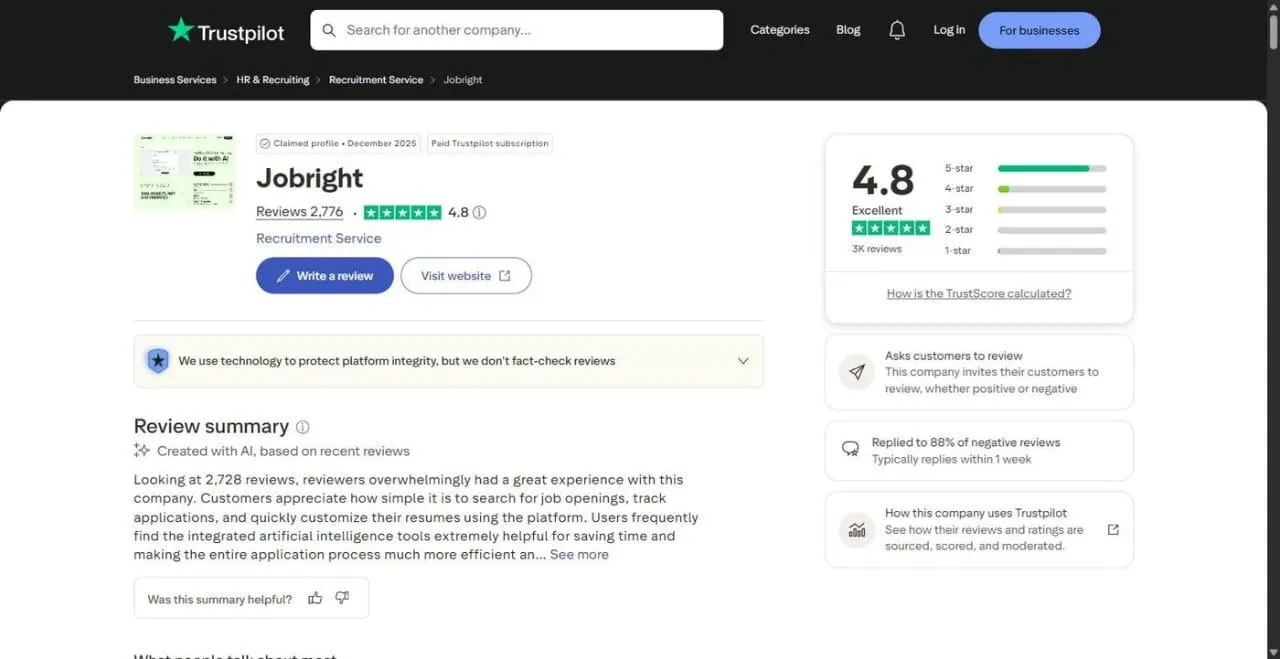
Trustpilot's AI-written review summary says users generally appreciate how easy it is to search for jobs, track applications and customize their resumes.
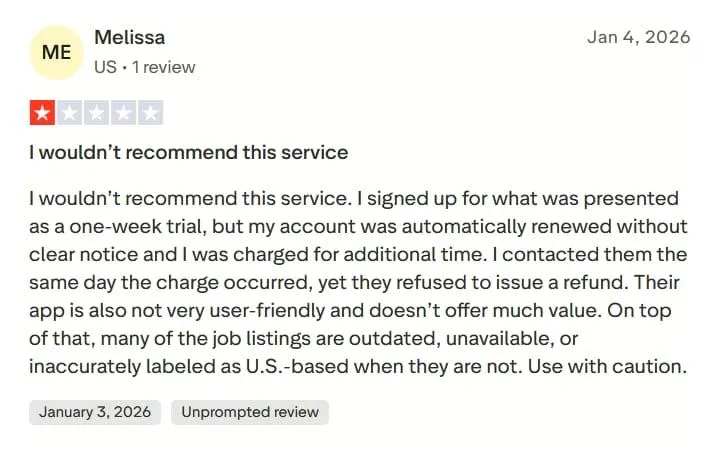
A US reviewer gave Jobright 1 out of 5 stars. They said what they understood to be a one-week trial renewed without clear notice, a same-day refund request was refused, and many listings were outdated, unavailable, or wrongly labeled as US-based.
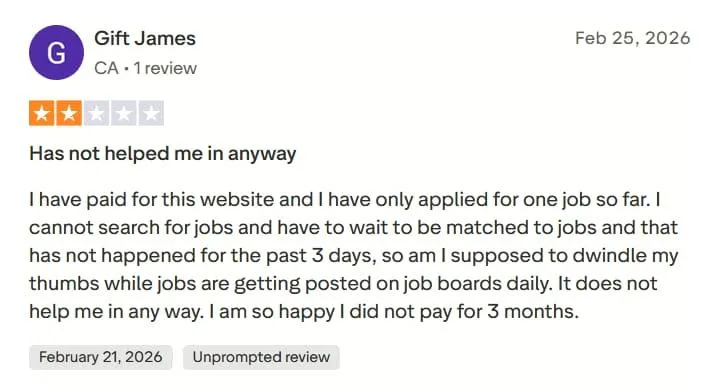
A reviewer from Canada gave it 2 out of 5 stars, saying they had paid, waited three days without new matches, and applied to only one job so far.
Is Jobright worth it? My verdict
Use Jobright if you're looking for work in the US, especially in tech or as a student or new grad, and you want relevant matches, a resume score, and referral contacts in one place. The free plan is enough to judge whether its matches suit you.
Skip it if you're job hunting outside the US, you want auto-apply without paying, or you'd rather know the price before signing up. If you do pay, set a reminder before the renewal date.
Jobright vs HiringNow: where do they differ?
| Jobright | HiringNow | |
|---|---|---|
| Main focus | AI job matching, autofill and referrals | Fresh jobs from career pages, tailored and auto-applied |
| Where jobs come from | Company career sites and job boards | 247,000+ company career sites, checked every 5 minutes |
| Auto-apply | Paid (Turbo) | Every plan, including 10 free auto-applies |
| Resume tailoring | Yes, with daily credits on the free plan | Every plan, for every application |
| Referrals | Insider connections | — |
| Interview prep | Orion and an interview question bank (paid) | AI mock interviews |
| Locations | US roles only | Global |
| Pricing shown before sign-up | No | Yes |
| Paid plans from | $17.99 a week or $39.99 a month | $29 a month |
Which should you choose?
Choose Jobright if:
- You're job hunting in the US and want strong matching with salary and visa signals.
- You want insider connections to ask for referrals.
- You want an AI copilot like Orion to talk through roles.
Choose HiringNow if:
- You want auto-apply on every plan, including free.
- You want new jobs found on company career pages and applied to early.
- You want a tailored resume and cover letter for every application.
- You're job hunting outside the US.
For more options, see our full list of the best Jobright alternatives, our guide to the best Simplify alternatives, where Jobright is one of five picks, and our list of the best auto-apply tools. Before you hand any tool your applications, read whether AI auto-apply tools are safe. You can also check your resume against a job description with our free ATS resume checker.
Frequently asked questions
Is Jobright legit?
Yes. Jobright is a real job search platform, not a scam: in my test it showed real, recently posted jobs with match scores. It's rated 4.8/5 from 3,656 reviews on Trustpilot. The most common complaints are about charges after a trial and job relevance, so check the renewal terms before you pay.
Is Jobright free?
Jobright has a free plan, but it runs on small daily credits for AI features like resume edits. In my test, the resume editor showed 0 credits left and the interview question bank was locked. Auto-apply and unlimited AI tools need Turbo, the paid plan.
How much does Jobright cost?
Jobright Turbo is reported at $17.99 a week, $39.99 a month, or $89.99 a quarter (about $30 a month), as of October 2026. Jobright doesn't publish a pricing page: you only see prices after you sign up, and offers such as student pricing or a time-limited discount can change what you pay.
Does Jobright work outside the US?
Not really. Jobright's App Store listing says it currently lists U.S.-based roles only. You can sign up from anywhere, but if you're looking for work in Canada, the UK, Europe or Australia, most of what it shows won't be relevant to you.
Does Jobright have a mobile app?
Yes. Jobright has apps for iPhone and Android. The iPhone app is rated 4.8/5 from 1,600 ratings on the App Store, and the Android app is rated 4.6/5 from 733 reviews on Google Play, with more than 50,000 downloads. Both carry the same job matching and tracking as the website.
Can Jobright replace LinkedIn or other job sites?
I wouldn't use it as a complete replacement. Jobright's strength is bringing job matching, resume tailoring and referrals into one place with AI help. Using it alongside other job boards and professional networks gives you access to more openings, especially outside the roles it covers well.
Does Jobright write cover letters?
Yes. Jobright says its cover letter generator uses your resume and the target job description to write a cover letter for that job, and you can refine it by chatting with Orion, its AI copilot. Read it before you send it, as you would any AI-written letter.
Can Jobright help me find internships?
Yes. Jobright has an Intern/New Grad filter, which I used in my test, and its matches showed early-career roles with salary ranges and how many people had applied. It also offers a student version of its paid plan, Turbo for Students.
Where does Jobright get its jobs?
Mostly from aggregation. Jobright's founder has said on Product Hunt that most of its jobs come from company career sites and job boards, matched to your profile. Jobright says it lists more than 8 million jobs, with over 400,000 added each day.
How does Jobright match you with jobs?
Jobright looks at more than job titles. It says its matching considers your resume, skills, experience, seniority, industry background, location and career goals. In my test, each job showed a match score, such as 92% Strong Match, plus tags like Early applicant and H1B Sponsor Likely.
Sources
- Jobright reviews, Trustpilot
- Jobright - AI Job Search, App Store
- Jobright - AI Job Search, Google Play
- Jobright Autofill, Chrome Web Store
- Jobright AI, Product Hunt